
In addition to automated batch editing and conversion of wafer map files, WMBatch now includes new functionality to support merging of wafer maps. Modern design automation may require comparing multiple probing results of the same wafer.
For example, a test engineer might look for trouble spots on a wafer by comparing AOI (Automated Optical Inspection) probe results and electrical probe results.
As devices sizes shrink, device counts on wafers increase. Making a manual visible comparison of multiple test results can be time consuming and error prone.
Being able to define formal rule-based comparisons of wafers, to generate a merged wafer map, can save time and highlight defects.
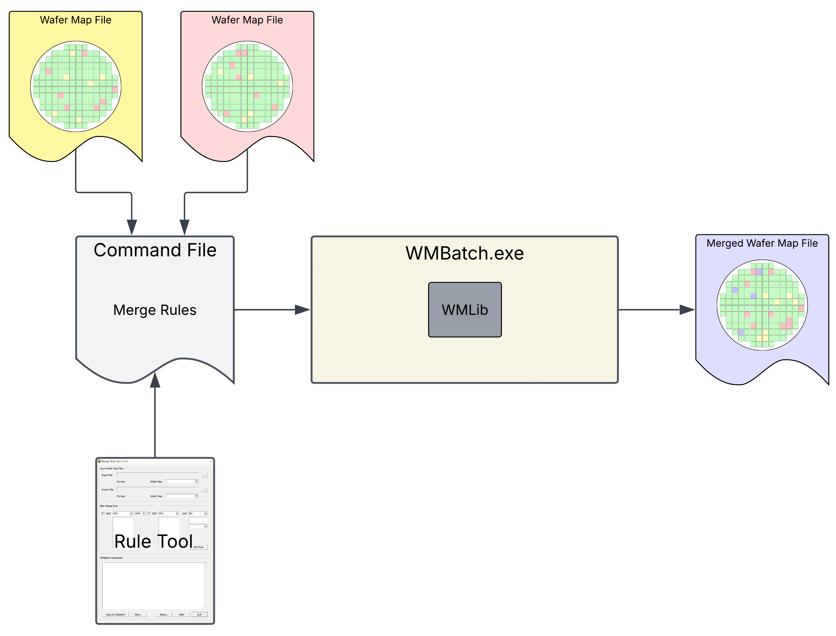
Architecture of the Wafer Map Merge.
WMBatch is based on Artwork's common wafer map library, WMLib. WMlib provides parsing, editing, converting, and writing of many ASCII, XML and binary wafer map formats.
WMBatch uses a command file to communicate instructions to WMLib. For merging wafer map files, the basic commands are:WMBatch includes a GUI utility called Rule Tool (RuleTool.exe). Rule Tool creates the command file automatically based on selections from the user. Command rules can also be created manually. The syntax is easy to learn and well-documented, along with example merge rules.